The best interview copilot answers fast, draws on your own résumé and the job post, stays out of the interviewer's view, and lets you test it free before you pay. Zustly suits engineers facing coding and system design rounds. CoPilot Interview suits price-sensitive candidates who like buying hours. Interview Copilot (interviewcopilot.io) suits people who want rehearsal built in. Interview Copilot AI (interviewcopilot.ai) suits a long search on one flat plan.
Plenty of candidates know the material and still freeze when a question lands. Search for this tool category and you get a pile of near-identical names that belong to different products. It is hard to tell which ones offer a real free plan, which ones handle coding rounds, and which ones cost more than the job search justifies.
I compared each tool on answer speed, personalization, coding support, privacy and price. Zustly is our product, so it comes first and you should judge it on the same facts as the others. For the other tools, I describe only what their own sites state. Prices change, so confirm them before you pay.
1. Zustly
How it works
Zustly is a desktop app for macOS 13+ and Windows 10+ that listens to your live call, reads your screen and shows talking points in a private overlay. It never joins the call as a bot, so it does not appear in the participant list. You upload your résumé and the job post once, and answers draw on your real projects and the role's keywords. Talking points stream in about 0.8 seconds, often before the interviewer finishes the question.
- Live transcript of both sides, kept separate
- Screen reading for coding prompts, slides and diagrams
- Behavioral, technical and quick-fire modes, with STAR prompts suggesting under 90 seconds
- Keyboard shortcuts, including ⌘\ to hide the overlay
- Works with Zoom, Google Meet, Teams, Webex, Slack Huddles, Discord, CoderPad and HackerRank
Zustly's edge is pairing screen reading with a protected overlay, which matters most in coding rounds.
Who it suits
Engineers and product managers in technical loops get the most from it. The overlay is hidden from screen share at the OS level on every plan, free included, so in a coding round the interviewer sees only your editor.
It is a weaker fit if you want a phone app or a flat monthly fee. Zustly is desktop-only and billed per hour of use on paid plans.
Free plan and pricing
The Starter plan is free, needs no credit card and gives you 10 minutes a day. It includes résumé and job description context, screen and code reading, STAR and technical modes, and the overlay. You can buy extra credits on any plan.
- Teams: $12.99 per hour, adds teammate invites and a shared workspace
- Business: $14.99 per hour, adds the most capable answer model, mock interview replays and priority support
2. Interview Copilot (interviewcopilot.io)
How it works
You add your résumé and the job description once, then open Interview Copilot in a browser tab beside your call or in its Mac app. The interviewer's question lands in the transcript, and you press Space or let Auto Answer fire. Its site lists Auto Answer on the Basic and Intensive plans. The site states first points arrive in about 1.5 seconds.
You pick the answer format. "Cue me" gives quick triggers, "Structure it" gives an approach, example and result outline, and "Formulate my answer" writes a full first-person reply. Interview modes include general, behavioral, system design and coding.
The three answer formats are its best idea, because you choose how much to read mid-sentence.
Who it suits
It fits candidates who want to rehearse before the call. Interview Coach comes with every plan, with feedback and a retry of the same question.
The weak spot is the free allowance. Twenty minutes a month does not cover one full interview, so treat it as a trial. The page also mentions a Mac app but no Windows app.
Free plan and pricing
The free plan gives 20 Copilot minutes every month. Paid plans are listed on its pricing page, so check there for current figures.
3. Interview Copilot AI (interviewcopilot.ai)
How it works
This desktop app for macOS and Windows hears the call through system audio and says it streams an answer in under a second. Glance mode compresses the answer into short cues so you can keep eye contact. For coding, one shortcut captures the task from your screen and returns the approach, working code, and time and space complexity.
A career profile stores your experience and best stories, and you choose what matters for each role. The site says the overlay stays hidden when you share a window or your whole monitor, and that no bot joins.
Its coding capture, which returns approach, code and complexity, is the feature to test first.
Who it suits
This one suits a long search. Both paid plans include unlimited use, so cost does not rise with the number of rounds.
The site also offers guidance on responsible use and optional disclosure tips. Read them, because the rules of each employer decide whether any copilot is safe to use.
Free plan and pricing
You can download the desktop app and test it on a practice interview without a credit card.
- Monthly: $49 per month
- Yearly: $149 per year, about $13 a month
- Refund: full refund if you email within 7 days of a payment
4. CoPilot Interview (copilotinterview.com)
How it works
CoPilot Interview is a desktop app for Windows 10/11 and macOS 12+. It transcribes the question and shows a structured answer in its own window in about 2 seconds. Dual AI mode streams answers from two models at once.
Extras include a Mock Interview mode, an Interviewer Mode for hiring, and a résumé builder. It lists Zoom, Teams, Meet, CoderPad, HackerRank, CodeSignal, Chime and HireVue, plus an Android beta.
Its real advantage is buying hours that never expire instead of committing to a subscription.
Who it suits
It suits budget-conscious candidates with one or two interviews coming up. It is also the pick if you want mock interviews and a résumé builder in the same app.
Its stated answer time is the slowest of the four. The free plan is capped at 15 minutes per session, so a full-length round needs a paid plan or an hour pack.
Free plan and pricing
The free plan gives 15 minutes a day. Its first paid tiers add longer sessions, and the upper tiers add more AI models.
- Standard: $24.99 per month, 60 minutes per session
- Pro: $39.99 per month, 70 minutes per session
- Pro+: $49.99 per month, adds Claude models
- Hour packs: $9.99 for 1 hour, $29.99 for 5 hours, $49.99 for 15 hours
- Refund: 14 days on a first payment, if you used under 30 minutes
5. How to compare and choose an interview copilot
Side-by-side comparison
Free access differs more than anything else, and a free plan only matters if it covers a real round. Here is how the four compare on what each site states.
| Tool | Free access | Stated speed | Paid pricing | Platforms |
|---|---|---|---|---|
| Zustly | 10 min/day | about 0.8 s | $12.99 to $14.99 per hour | macOS 13+, Windows 10+ |
| Interview Copilot (.io) | 20 min/month | first points about 1.5 s | See its site | Browser tab, Mac app |
| Interview Copilot AI (.ai) | Test on a practice interview | under 1 s | $49/month, $149/year | macOS, Windows, phone |
| CoPilot Interview | 15 min/day | about 2 s | $24.99 to $49.99/month, packs from $9.99 | Windows, macOS, Android beta |
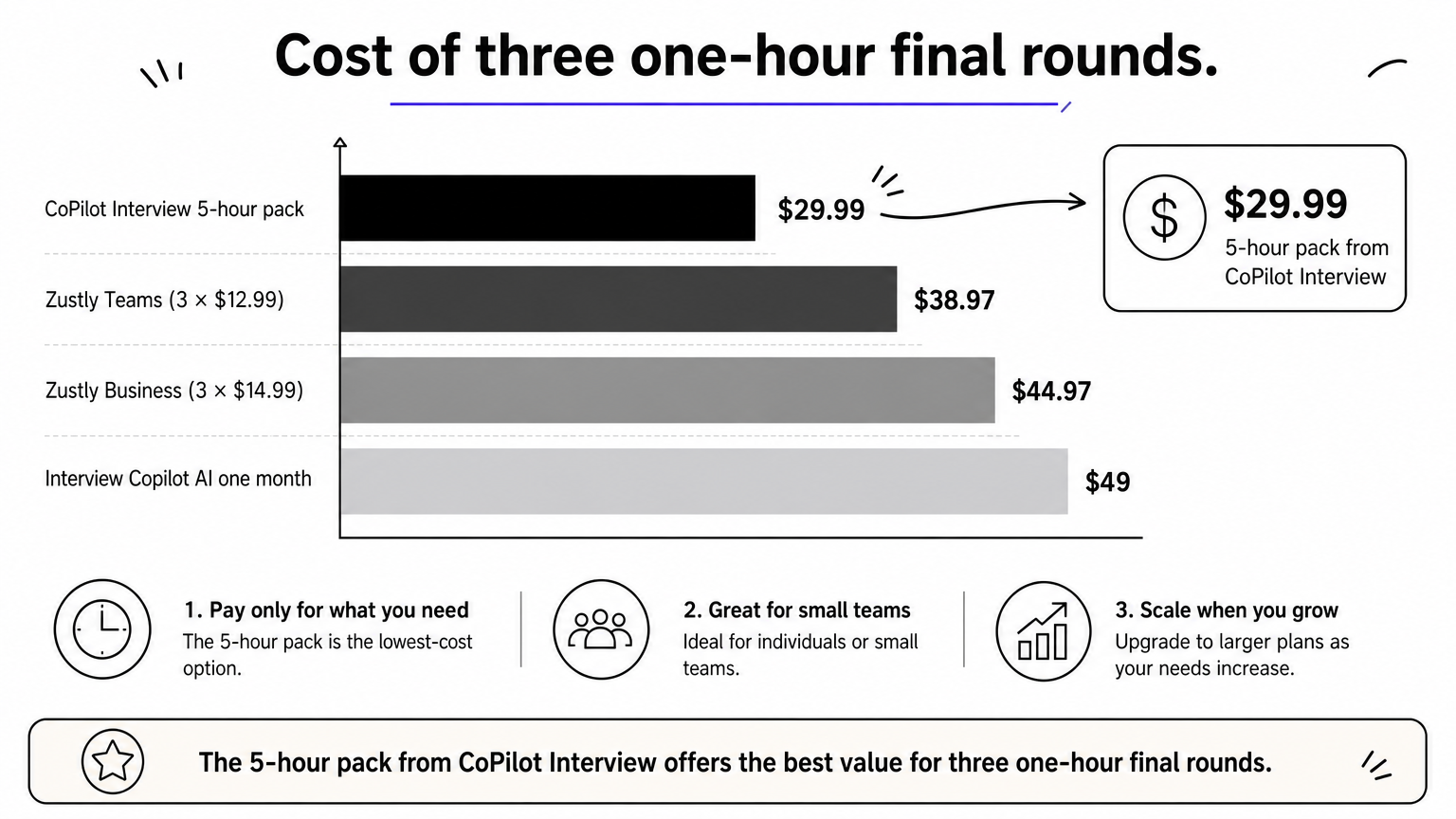
Take a typical search with three one-hour final rounds. Zustly Teams costs 3 × $12.99 = $38.97, and Business costs 3 × $14.99 = $44.97. CoPilot Interview's 5-hour pack costs $29.99, and one month of Interview Copilot AI costs $49. Starter's 10 minutes a day will not cover an hour-long round, so you would buy credits.
Is an interview copilot detectable?
No tool can promise it is undetectable everywhere. Detection depends on how the tool shows up. A bot in the participant list is visible. A local overlay hidden from screen shares, recordings and screenshots, as in Zustly, is not. It also depends on what the employer controls, such as proctoring software or a managed laptop.
Many employers ban AI help in interviews and can withdraw an offer over it. Use a copilot on your own computer, check the interview rules, and never read answers word for word. Pauses and eye movement give people away faster than software does.
How to test one before you commit
Run the same five checks on every tool. You will see its gaps in about an hour.
- Start a mock call with a friend on your real platform, share a window and then your whole screen, and confirm the overlay is absent.
- Ask a question you did not prepare and time the first words.
- Upload your résumé and job post, then ask about a project to see if the answer cites it.
- Paste a sample problem into CoderPad or HackerRank and test the screen reading.
- Compare the free minutes against your longest interview.
You will also see Final Round AI, LockedIn AI, Sensei AI, a Chrome extension and Interview Pilot, an iPhone app built around mock interviews. The same checklist applies to them.
Pick one, test it, then decide
A good interview copilot is fast, grounded in your own résumé, hidden from the screen share, and honest about its free limits. Zustly leads for coding and system design rounds, CoPilot Interview wins on flexible hourly spend, Interview Copilot AI fits a long search on a flat plan, and Interview Copilot (.io) fits rehearsal first.
Test two tools on a mock call before your real interview, and read your employer's rules on AI help. If you want to start with a free plan, you can try Zustly's free Starter plan with no credit card and see the overlay in action.